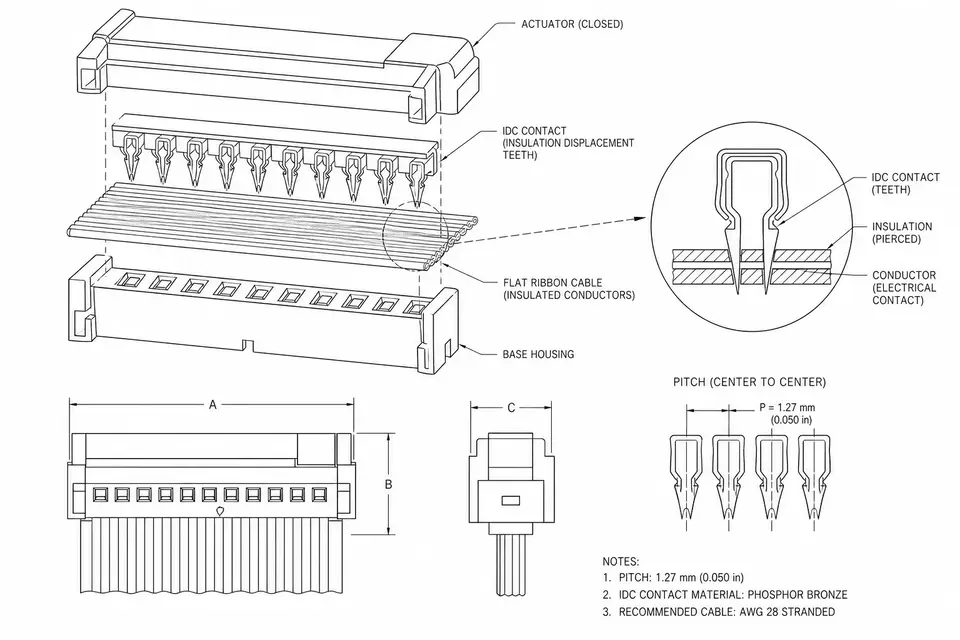
What does IDC mean in a ribbon cable?
IDC means insulation displacement contact or connection; an IDC connector contains these contacts. A compatible insulated conductor is pressed into the contact slot, which displaces insulation and contacts the conductor. A ribbon arrangement allows multiple contacts to be terminated together, rather than stripping and terminating each wire separately.
Amphenol's IDC overview explains the termination method and cable-to-board families. The method still requires the specified cable, connector, tooling and assembly procedure. Do not equate a fast press operation with a tool-free or automatically qualified connection.
Connector pitch is not ribbon conductor spacing
The word pitch needs a reference. Mating contact pitch, row spacing and ribbon conductor spacing describe different dimensions. Read the connector drawing and cable specification together; a single number in an RFQ is insufficient.
For example, the 3M 451/452 flyer describes a 1.27 mm mating system using 0.635 mm conductor-pitch ribbon cable. This is a family-specific example, not a conversion rule for every IDC connector.
| RFQ field | What to specify | Why it matters |
|---|---|---|
| Mating pitch and rows | Connector drawing dimensions | Matching the board header |
| Ribbon conductor spacing | Cable drawing dimension | Aligning conductors with IDC contacts |
| Contact and conductor counts | Exact part options | Defining populated positions |
| Wire construction and insulation | Approved cable number and wire range | Making a compatible termination |
| Contact numbering | Connector view and pin-one datum | Preventing mirrored maps |
| Cable exit and keying | Dimensioned connector views | Avoiding reversed installation |
| Strain relief and route | Required accessory and clearance | Managing installed mechanical load |
Pin one, the stripe and the wiring diagram
A colored edge stripe identifies a ribbon conductor; it does not independently prove its destination in a completed assembly. State which conductor lands on pin one at each end and identify whether the drawing view is the mating face or cable side. Copy the maker's contact numbering rather than inventing an odd/even numbering scheme.
Example: two identical sockets can be fitted with different cable exit directions. Before pressing either end, use the drawing to reconcile the stripe, pin-one marker, key and cable exit. Verify the resulting point-to-point map electrically. This example describes a review task, not a universal instruction for rotating a connector.
IDC ribbon or individual crimped wires?
| Project requirement | IDC ribbon consideration | Discrete-wire consideration |
|---|---|---|
| Repeated parallel connections | Mass termination may simplify assembly | Contacts terminated individually |
| Different wire sizes or insulation | Check the connector's approved cable combination | Each contact/wire combination needs approval |
| Branches and three-dimensional routing | Review ribbon geometry and exit constraints | Independent conductors allow different routing |
| Motion, vibration or signal integrity | Validate the selected family and channel | Validate the selected family and channel |
Harwin's IDC versus discrete-cable guide highlights cable/contact matching and routing constraints. Do not classify all IDC as unsuitable for high-speed signals or all discrete wiring as more reliable. Required performance depends on the actual components, pin assignment, channel and installed environment.
Prepare the drawing and verify the assembly
Provide connector and header numbers, approved ribbon cable, dimensions, contact count, connector views, full pin map, keying, stripe assignment, strain relief, quantity and operating conditions. A reference photo supports identification but does not replace these definitions.
Review the press setup and finished cover seating against the maker's procedure. Check for cable misalignment, damaged insulation, missing accessories and wrong orientation. Use a controlled electrical map for opens, shorts and miswires. Add retention, motion or transmission tests when the design requires them, with documented conditions and acceptance limits.
Use IDC pitch options for interface selection, ribbon IDC for assembly definition and custom pin mapping for mapped designs. Electrical test planning helps separate wire-map release checks from application qualification.